


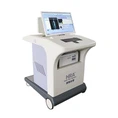

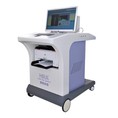
In today's digital age, the integration of medical devices with mobile technology has revolutionized the healthcare industry. As a leading supplier of body check - up machines, I am often asked about the process of connecting these machines to mobile phones. This connection offers numerous benefits, including real - time data access, remote monitoring, and easy sharing of health information. In this blog, I will guide you through the steps of connecting a body check - up machine to a mobile phone.
Understanding the Types of Body Check - Up Machines
Before we delve into the connection process, it's essential to understand the different types of body check - up machines available in the market. Our company offers a wide range of devices, such as the Sub - Health Analyzer, the Full Body Health Analyzer Machine, and the Health Risk Appraisal System Machine. Each of these machines has unique features and functions, but they all share the common goal of providing comprehensive health assessments.
The Sub - Health Analyzer is designed to detect early signs of sub - health conditions, allowing users to take preventive measures. The Full Body Health Analyzer Machine offers a more in - depth analysis of the body's various systems, while the Health Risk Appraisal System Machine helps in assessing the risk of developing certain diseases.


Prerequisites for Connection
To connect a body check - up machine to a mobile phone, several prerequisites must be met. First, the body check - up machine must be equipped with Bluetooth or Wi - Fi capabilities. Most modern machines come with these features, as they enable seamless data transfer. Second, the mobile phone should have the corresponding app installed. Our company provides dedicated apps for each of our body check - up machines, which can be downloaded from the app store.
It's also important to ensure that both the machine and the mobile phone are running on the latest software versions. Software updates often include bug fixes and new features that can enhance the connection process and the overall user experience.
Connecting via Bluetooth
Bluetooth is one of the most common methods of connecting a body check - up machine to a mobile phone. Here are the general steps:
- Power on the Machine: Turn on the body check - up machine and put it in pairing mode. Usually, this involves pressing a specific button or following the instructions on the machine's display.
- Enable Bluetooth on the Mobile Phone: Go to the settings menu on your mobile phone and turn on the Bluetooth function.
- Search for Devices: Once Bluetooth is enabled, the mobile phone will start searching for nearby Bluetooth devices. Look for the name of your body check - up machine in the list of available devices.
- Pair the Devices: Select the body check - up machine from the list and click the "Pair" button. You may be asked to enter a passcode, which is usually provided in the machine's user manual.
- Open the App: After successful pairing, open the dedicated app for your body check - up machine on the mobile phone. The app should automatically detect the connected device and establish a connection.
Connecting via Wi - Fi
Some body check - up machines support Wi - Fi connection, which offers a more stable and long - range connection compared to Bluetooth. Here's how to connect via Wi - Fi:
- Connect the Machine to the Wi - Fi Network: Follow the instructions in the machine's user manual to connect it to your home or office Wi - Fi network. You may need to enter the Wi - Fi network name (SSID) and password.
- Open the App on the Mobile Phone: Make sure the mobile phone is also connected to the same Wi - Fi network. Open the dedicated app for the body check - up machine.
- Search for the Machine: In the app, look for the option to search for devices on the Wi - Fi network. The app will scan for the body check - up machine and display it if found.
- Establish the Connection: Select the machine from the list and click the "Connect" button. The app will establish a connection with the machine, and you can start using it to access the health data.
Troubleshooting Connection Issues
Sometimes, you may encounter issues when trying to connect a body check - up machine to a mobile phone. Here are some common problems and their solutions:
- Device Not Found: If the mobile phone cannot find the body check - up machine, make sure the machine is in pairing mode and that Bluetooth or Wi - Fi is enabled on both devices. You can also try restarting both the machine and the mobile phone.
- Connection Drops: If the connection drops frequently, check the signal strength of the Bluetooth or Wi - Fi network. You may need to move the machine and the mobile phone closer to each other or change the location of the Wi - Fi router.
- App Compatibility Issues: If the app is not working properly, make sure you have installed the latest version of the app. You can also try uninstalling and reinstalling the app.
Benefits of Connecting to a Mobile Phone
Connecting a body check - up machine to a mobile phone offers several benefits. Firstly, it allows for real - time data access. You can view your health data immediately after a check - up, without having to wait for a printed report. This is especially useful for people who need to monitor their health conditions regularly.
Secondly, remote monitoring becomes possible. Family members or healthcare providers can access the health data remotely, which is beneficial for elderly or chronically ill patients. They can keep track of the patient's health status and provide timely advice or intervention.
Finally, it enables easy sharing of health information. You can share your health data with your doctor or other healthcare professionals via email, messaging apps, or the app's sharing feature. This can facilitate more informed medical decisions.
Conclusion
Connecting a body check - up machine to a mobile phone is a straightforward process that offers numerous benefits. Whether you choose to connect via Bluetooth or Wi - Fi, following the steps outlined in this blog will help you establish a successful connection. As a supplier of high - quality body check - up machines, we are committed to providing our customers with the best products and support.
If you are interested in purchasing our body check - up machines or have any questions about the connection process, please feel free to contact us for procurement and negotiation. We look forward to working with you to improve your health monitoring experience.
References
- Manufacturer's user manuals for body check - up machines
- Mobile app documentation provided by our company